Claude Code Setup
Minimal Claude Code reference setup on macOS: Ghostty, ccstatusline, ccusage, plugins and language servers (LSPs).

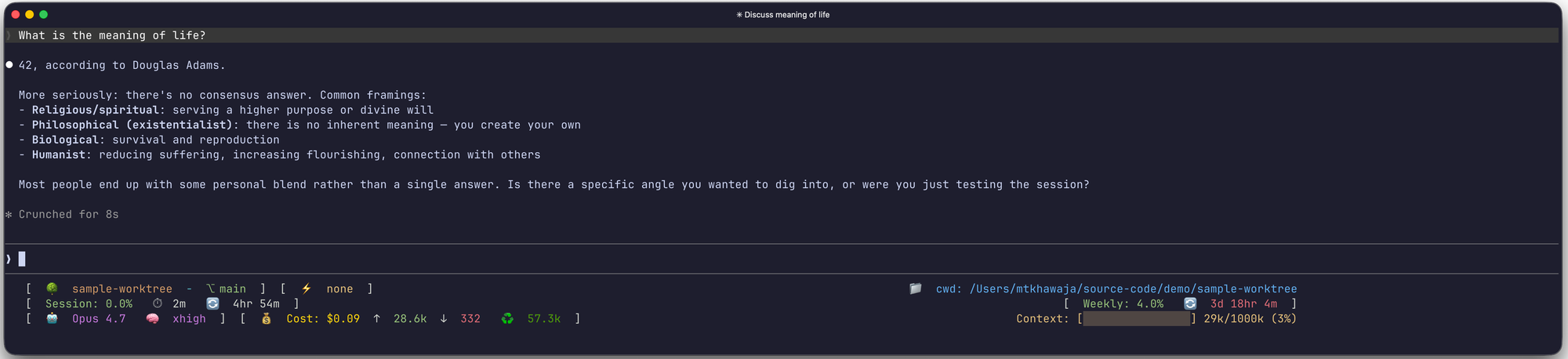
This article is a reference for my personal Claude Code setup on macOS. It covers the terminal, status line, usage reporting, plugins, and language servers.
I deliberately lean on plugins rather than hand-rolled MCP server configurations. A plugin is a single install that bundles whatever skills, tools, and MCP servers it needs;
Plugins, LSPs, MCPs etc. should be selectively enabled. Every plugin and LSP pushes tool definitions and instructions into the context window, and context is the scarcest resource in any agentic session.
Ghostty
Ghostty is my terminal emulator of choice. It’s fast, minimal and basically offers a sane user experience out of the box.
Status Line with ccstatusline

ccstatusline renders the bottom-of-screen status line in Claude Code:model, working directory, token usage, git branch, and so on.
It runs as the statusLine command and (optionally) as a hook so the line refreshes after each prompt and tool invocation.
The quickest install is via the bunx one-liner from the quick start guide:
#!/usr/bin/env zsh

# Pulls the latest release at runtime. Configuration is written to
# $HOME/.config/ccstatusline/settings.json
bunx -y ccstatusline@latest
My current configuration lives in my dotfiles repository and can be dropped into
$HOME/.config/ccstatusline/settings.json:
Usage Reporting with ccusage
ccusage reads the local Claude Code session logs and reports token usage and cost. Useful for spot checking how much a long debugging session actually consumed and for monthly retrospectives.
#!/usr/bin/env zsh

# See: https://github.com/ryoppippi/ccusage#usage

bunx ccusage@latest             # one-shot run, equivalent to the daily report
npx ccusage@latest              # daily report (default)
npx ccusage@latest daily        # daily token usage and costs
npx ccusage@latest monthly      # monthly aggregated report
npx ccusage@latest session      # per-session usage breakdown
Plugins
Again, not all plugins should be enabled all the time. The cost of leaving every plugin enabled globally is non-trivial: each one injects skill definitions and tool schemas into the context window even when it is not being used.
The plugins in rotation:
- Superpowers: Skills framework covering brainstorming, planning, TDD, debugging, code review, parallel agent dispatch, and a few dozen more. The most context-expensive of the set, but the one that most reshapes how a session is run. (I can not use Claude Code without it.)
- Frontend Design: Skill for producing distinctive, production-grade frontend code. Enable for UI work, leave off for backend tasks.
- Atlassian: Jira and Confluence integration. Actually a lot more powerful than you might initially think; a ticket becomes a portable context bundle the agent(s) can pull in (description, acceptance criteria, threaded comments, linked issues).
- Playwright: Browser automation. Enable when there is a frontend to drive from tests or when scraping is part of the task.
- Context7: On-demand library documentation lookup.
Language Servers (LSPs)
Claude Code can attach to language servers via LSP plugins, giving the model access to real diagnostics, hovers, go-to-definition, and rename operations rather than relying on grep and inference alone.
The cost is the same as any other plugin: schema bytes in the context window plus a background process; Useful enough that it is worth turning on for the relevant language and off for everything else.
See Claude Code LSP Reference for more details.
The pairings I use:
-
Java jdtls-lsp plugin backed by the Eclipse JDT Language Server:
#!/usr/bin/env zsh brew install jdtls -
Python pyright-lsp plugin backed by Pyright:
#!/usr/bin/env zsh

brew install pyright